1. Introduction
Congratulations on your purchase of AnchorVate, an innovative wireless solution for keeping track of anchor-chain deployment using your smartphone or Tablet.
AnchorVate senses windlass rotation and converts revolutions into chain movement. The deployed-chain value is sent to the AnchorVate app. The app also shows remaining chain, connection status, battery level and movement direction.
| AnchorVate is a measurement aid, it is not a substitute for good seamanship! Always use appropriate anchoring practices according to conditions to ensure safety of the vessel and crew |
2. Inside the Box
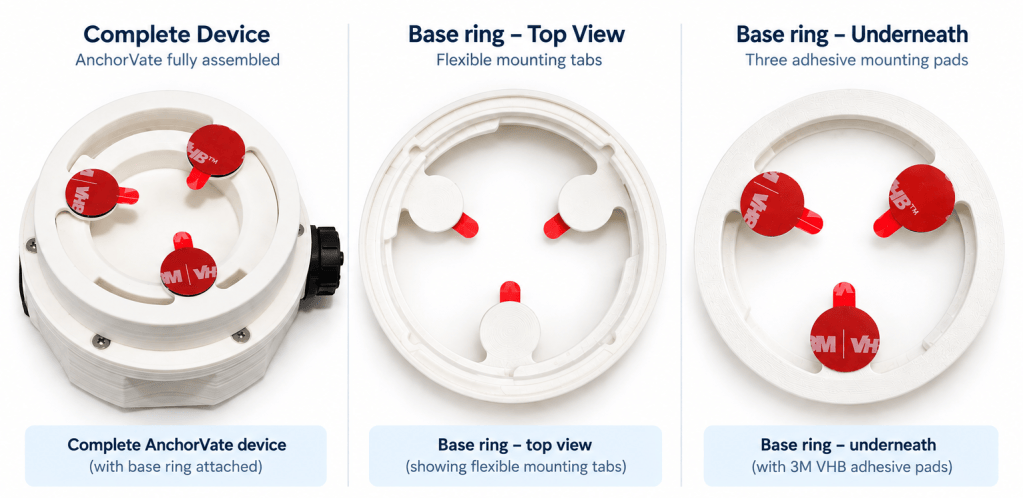
Inside the box you will find the AnchorVate device with the base ring fitted to it.
To remove the base ring from AnchorVate, hold the ring and twist AnchorVate 90 degrees clockwise when looking at the base ring.
3. Installing the Base Ring
- Remove the base ring from the device by twisting it clockwise when looking at the base ring.
- The base ring must be mounted on a rotating face of the windlass, horizontally or vertically.
- Test fit the ring. If the rotating windlass face is dome shaped the three tabs of the base ring should be pushed gently inwards to make them adapt to the curvature and ensure full contact.
- Make sure the surface is clean and dry. A final wipe with a suitable surface cleaner is recommended.
- Fit the ring. Gently peel the protective red film from the three mounting pads. Avoid touching the adhesive surfaces with your fingers.
- Press the three tabs firmly onto the rotating windlass face, keeping it as centred as possible.
- Apply firm pressure on the three tabs for 30-60 seconds.
- Allow at least 1 hour for the bond to set before fitting and using AnchorVate
| Mounting requirement The device must rotate with the windlass face. Do not mount the base ring on a stationary cover or housing |
| Do not fit AnchorVate immediately. Allow at least 1 hour after bonding the base ring before first use. Approximately 50% of the bond strength is achieved after 20 minutes, 90% after 24 hours and full strength after 72 hours. |
4. Downloading the App
The AnchorVate app is needed to manage the device settings and show the chain reading.
4.1 ANDROID
Open Google Play Store and search for AnchorVate
Or scan the QR Code below:

4.2 APPLE – IOS
Open Apple App Store and search for AnchorVate
Or scan the QR Code below:

| Allow Permissions Allow all Bluetooth and location permissions requested by the app when installing. If these permissions are not granted the device will not work. |
5. Settings
Before using Anchorvate, the system settings should be adjusted and calibrated for the Windlass it is being installed on by carrying out the steps below:
- Stick the base ring to the windlass (ref section 3)
- Mount AnchorVate on the base ring and turn it anticlockwise to lock it in. It will stop turning when fully clipped. The base ring must have bonded for at least 1 hour before first use.
- Switch on the Anchorvate device by pressing the black switch. It will light up in Blue when on. (If Anchorvate is not used after a few minutes it will switch to standby and the LED will turn off (More on this feature later in this document)
- Ensure that the Smartphone / Tablet has Bluetooth switched on.
- Open the Anchorvate App.
- The App will connect automatically to the device and it will show ‘Connected’ on the top left corner.
- Click on the ‘Gear wheel’ symbol at the top right to access the settings screen as shown below:
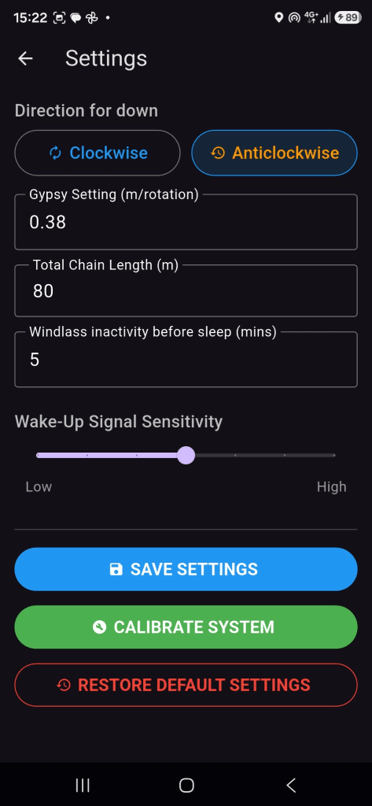
| Connection required Settings can only be modified while AnchorVate is switched on and connected. When disconnected, the app disables the device-setting controls. |
5.1 Direction for Down
This setting tells AnchorVate which direction the windlass turns when lowering chain as viewed from above (the side of the embossed logo)
- Select Clockwise if that direction lowers the chain.
- Select Anticlockwise if that direction lowers the chain.
5.2 Gypsy Setting (m/rotation)
The gypsy setting is the amount of chain moved by one complete windlass revolution. The default setting is 0.38 m/rotation. This setting should be adjusted to ensure accurate anchor chain readings by either doing a manual measurement or using the ‘Calibrate System’ Feature:
5.2.1 Manual measurement
- Mark the chain and the gypsy at a reference point.
- Turn the windlass through exactly one complete revolution.
- Mark the chain again when the gypsy returns to the reference point.
- Measure the distance between the two chain marks in metres.
- Enter that value in Gypsy Setting (m/rotation), then press SAVE SETTINGS.
5.2.2 Automatic Calibration
- Measure and mark a known length of chain, for example 5 m or 10 m.
- Open Settings and confirm Direction for down is correct.
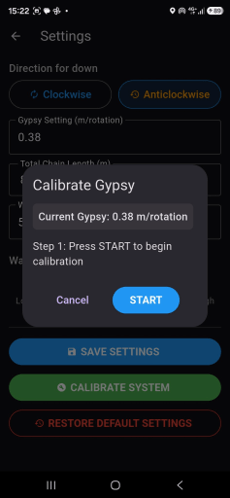
- Press CALIBRATE SYSTEM.
- Press START. The app resets the calibration count and begins measuring windlass revolutions.
- Lower the measured length of chain until the set mark and stop the windlass.
- Press STOP.
- Enter the actual deployed length in metres.( Eg. 5 or 10)
- Press SAVE. The app calculates the gypsy value from the measured deployment and sends the new value to AnchorVate.
5.3 Total Onboard Chain Length
The user can enter the total chain carried onboard. The app uses this value to calculate the REMAINING CHAIN which is shown on the Main Screen during normal operation. The system will also Warn the user when less than 10% of the chain is left when deploying the chain.
5.4 Windlass inactivity before sleep
Anchorvate is designed to remain switched on and there is no need for the user to switch it on and off every time it is needed. The device will go into deep sleep after a number of minutes as set in this setting in order to extend battery duration. The default setting is 5 minutes of inactivity before going into deep sleep.
5.5 Wake-Up Signal Sensitivity
This setting determines the movement needed to wake up the device from deep sleep and start counting. The default value is 4. If the device wakes continuously during normal boat movement the sensitivity can be decreased. Conversely, if the windlass operation does not reliably wake it the sensitivity can be increased.
5.6 Saving and restoring settings
Press SAVE SETTINGS to validate the entries and send the gypsy, rotation direction, timeout and sensitivity settings to the connected device. RESTORE DEFAULT SETTINGS restores the app defaults. After restoring defaults, press SAVE SETTINGS to ensure the displayed settings are transmitted to AnchorVate
| Default Settings • Rotation profile Anti-Clockwise. • Gypsy 0.38 m/rotation • Total chain 80 m • Sleep timeout 5 minutes • Wake-up sensitivity 4 |
6. Using Anchorvate
6.1 Switching On
- Mount AnchorVate on the base ring and turn it anticlockwise to lock it in. The base ring must have bonded for at least 1 hour before first use.
- Switch AnchorVate on using the power button.(This may be done once and not every time the windlass is operated. The device will go into deep sleep and wake up automatically when needed).
- Make sure Bluetooth is enabled on the smartphone / tablet.
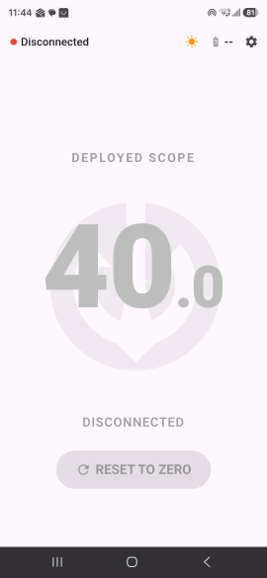
- Open the AnchorVate app. It may initially show Disconnected while scanning.
- When Bluetooth connectivity is established, the status changes to Connected and the app waits for live device data.
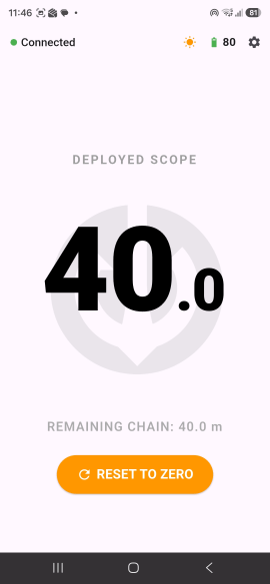
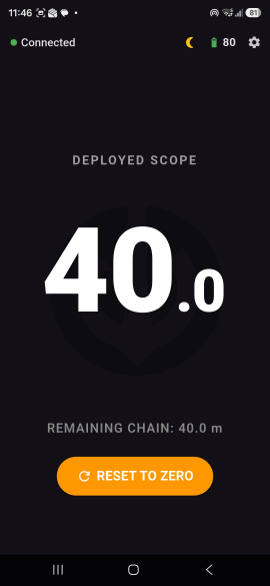
6.2 Main screen
Once connected, operate the windlass normally. AnchorVate measures rotation and the app shows the chain deployed as the windlass lowers or retrieves chain.
| Screen item | Purpose |
| Connection indicator | Green Connected or red Disconnected status. |
| Battery | Battery percentage reported by AnchorVate. |
| Sun / Moon | Switches between light and dark display modes. |
| DEPLOYED SCOPE | Large central value showing the current deployed-chain length. |
| Movement arrows | Blue downward arrows indicate deployment; green upward arrows indicate retrieval. They fade after movement stops. |
| REMAINING CHAIN | Total onboard chain minus deployed chain. |
| 90% warning | At 90% or more of configured total chain length, the app displays a red deployment warning and highlights the deployed value. |
| RESET TO ZERO | Sets the deployed-chain count to zero after confirmation. It is enabled only while connected. |
6.3 Deploying and retrieving chain
As the windlass rotates in the configured lowering direction, the deployed count increases. Rotation in the opposite direction reduces the count. The device and app preserve the last chain count so it can be restored after reopening or reconnecting.
| If AnchorVate is powered off from the switch or the battery runs out while the windlass is moving, the chain movement cannot be measured and the displayed value will no longer match the physical chain position. |
6.4 Resetting to zero
Use RESET TO ZERO only when the physical chain position genuinely corresponds to zero deployed. The app asks for confirmation and resets the count to Zero on the device.
6.5 Switching Off
When Anchorvate is not going to be used for a long time it should be switched off from the Switch and removed from the Windlass. Doing this will increase battery life and reduce the exposure of the device to the elements.
7. Charging
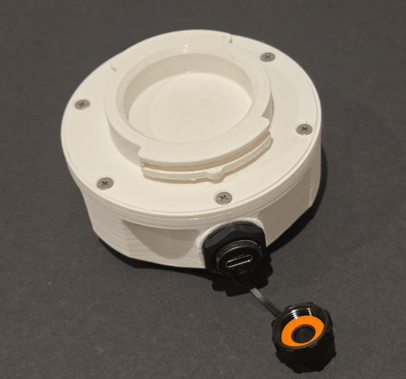
- The AnchorVate battery level is shown in the app while the device is connected. Anchorvate has intelligent power saving features and the battery will last for a long time in normal operation. When the battery is low, switch the device off and charge it through the USB-C charging port using a suitable standard USB-C charger. The USB-C Charging point is protected by a waterproof cover which must be screwed off. It is important that the cap is screwed back again correctly to ensure that moisture does not reach the charging socket.
8. Frequently Asked Questions
- I have installed the app and switched on AnchorVate but it remains disconnected
Make sure Bluetooth of the phone / tablet is on.
If it remains disconnected it could be due to missing permissions. Uninstall the Anchorvate app and reinstall it. Make sure that all permissions requested are granted.
2. The app has connected but the counter remains at 0 when lowering chain.
Make sure that the Direction for Down is set correctly in Settings. If the selected direction does not match the windlass lowering direction, change Clockwise to Anticlockwise or vice versa and press SAVE SETTINGS. If the direction is correct, check that the device is securely mounted on a rotating face and recalibrate if necessary.
3. The counter changes but does not show accurate readings.
Check the Gypsy Setting (m/rotation). Re-measure it manually or use CALIBRATE SYSTEM. Also confirm the base ring is secure and rotates with the windlass face.
4. The device is not switching on.
Press the man switch off and on again. If it does not switch on the battery may be fully discharged. Switch the device off and charge it through the USB-C port, then try again.
5. The remaining-chain value is wrong.
Check Total Onboard Chain Length in Settings and make sure the deployed-chain count itself is correct.
6. Settings are greyed out.
Device settings are intentionally disabled while AnchorVate is disconnected. Switch on AnchorVate and wait for Connected status.
7. The device goes in to deep sleep but switched on too often
Access the Settings screen and adjust the Wake-Up Signal Sensitivity to make it less sensitive.
8. The device goes into deep sleep and does not always switch on when using the Windlass.
Access the Settings screen and adjust the Wake-Up Signal Sensitivity to make it more sensitive.
9. Safety and Care
- Switch off and remove from the Base Ring when not in use for long periods.
- Mount only on a suitable flat rotating windlass face.
- Allow the base-ring adhesive at least 24 hours to bond before first use.
- Make sure AnchorVate is securely clipped and locked onto the base ring before operating the windlass.
- Make sure that USB charging port is closed securely during normal operation.
10. Support
Requests for support or to obtain further information contact sparkvate by email on: sparkvate@gmail.com